From your goals to your day.Planned, tracked, improved.
Set your goals, plan your day in 15-minute blocks, and see exactly where your time went. Productivity Timesheet connects the three so you can close the gap between intention and reality — every single day.
Individual: 7-day free trial · No credit card required · Windows 10 (64-bit) or later
Also available: yearly billing and Team plans for your whole organization.
To-Dos
From To-Do to Time Block.
Plan your week, keep tasks simple, and move what matters directly into your day.
Split View
Your tasks. Your schedule. Side by side.
Keep your To-Dos next to your Timesheet and drag tasks directly into the time slots where you plan to work on them.
Scheduled status stays visible while you plan.
The review loop
Plan what matters. See what happened.
Productivity Timesheet connects priorities, scheduled time, and actual activity — so your review is based on the day you really lived.
Did I complete what mattered? Did my time go to high-priority work? How did planned time compare with actual time? How much time was wasted?
Being busy isn't the same as making progress.
A calendar tells you where to be. A to-do list tells you what's left. Neither one tells you whether today actually moved you toward what matters. Productivity Timesheet connects your goals to your daily plan, then shows you what you actually did — so you can close the gap instead of just guessing at it.
One system for your goals, your time, and your progress.
From where you want to be in three years to what you should be doing in the next 15 minutes.
Long-Term Goals
Where you want to be
Short-Term Goals
This week, this month, this quarter
Today's Plan
15-minute blocks, built from your priorities
Execution
Tracked as you work, popup included
Review & Improve
See the gap, adjust tomorrow's plan
From where you want to be to what matters this week.
Set goals across Today, Short Term (week, month, quarter) and Long Term (year, 3 years), organized by the areas of life you care about — Business, Career, Health, or categories you define yourself.
Every 15 minutes can move you closer to your goal. Make sure they do.
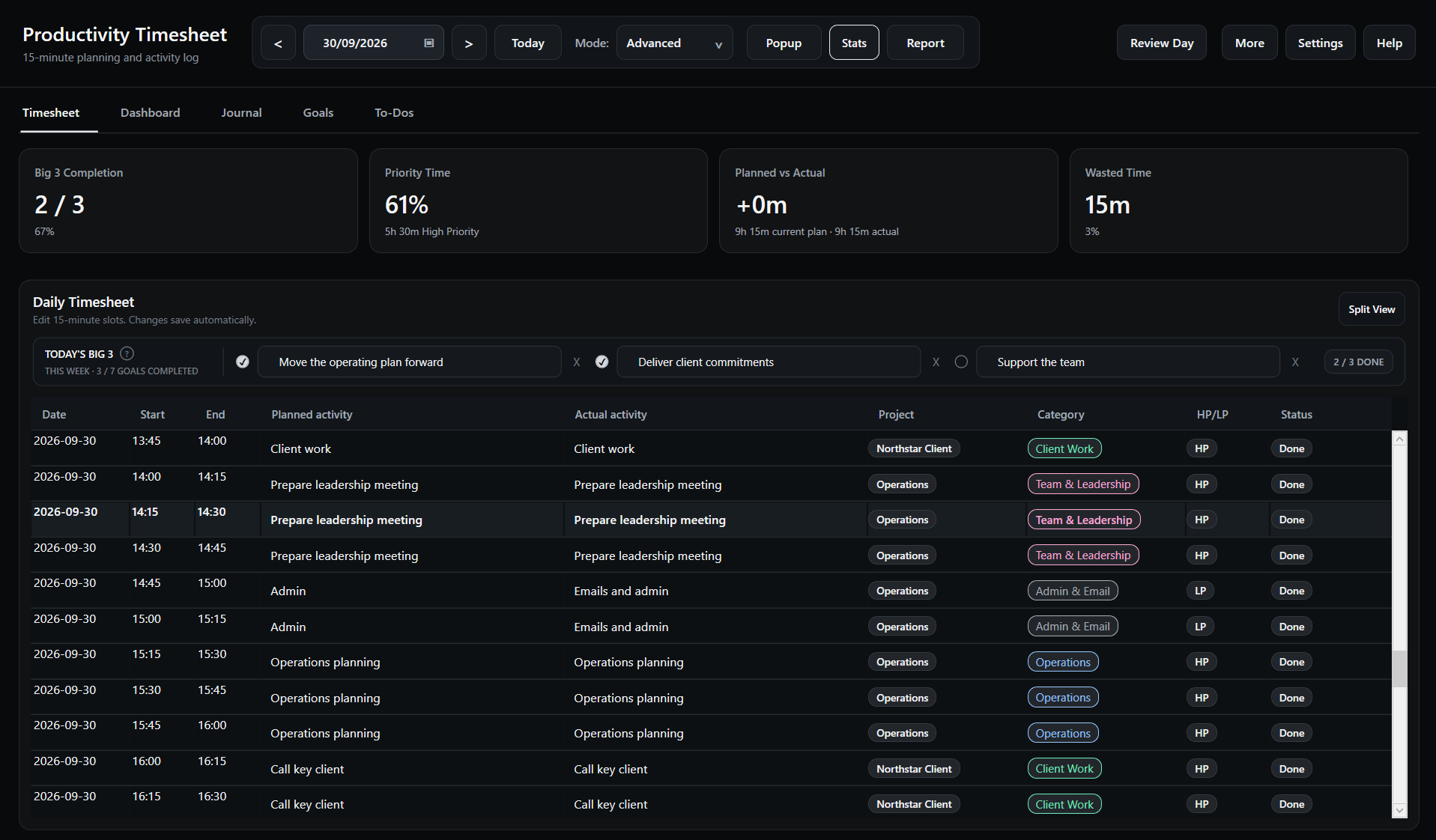
Plan your day in 15-minute blocks — enough detail to see where an hour actually went, without tracking every second. Each block holds a planned activity and, once the time passes, what you actually did.
Your plan stays with you while you work.
A small, always-on-top popup follows you between apps. It shows what you planned for right now, what's next, and your progress on Today's Big 3 — so your plan never gets buried behind another window. Collapse it to a single line, or expand it to log your actual activity without switching screens.
Start the day with intention, not your inbox.
A short morning focus check-in asks what you're grateful for and pulls in your active goals for context, then has you confirm Today's Big 3 — the three things that would have the biggest impact on your day, before you plan a single block.
See the difference between intention and reality.
Planning is only half the story. Productivity Timesheet keeps your planned activity and your actual activity side by side, block by block, so the difference between what you meant to do and what you did is never hidden. It's a tool for self-accountability — not a monitoring system. Nothing is tracked automatically, and nothing is sent anywhere without you choosing to.
Close the day the same way you opened it.
Before you finish, a quick review shows how many of your Big 3 you completed, how well your day matched your plan, and where you stand on your weekly goals — then asks one simple question: did your time go toward what mattered most today?
A running record of your mornings and evenings.
Your gratitude notes, Big 3 and evening reflections are kept in a dedicated Journal you can look back through by date, so you can see how your thinking — and your follow-through — changes over time. You can export your Journal whenever you want it outside the app.
Make the review concrete.
The current stats answer useful questions: did you complete what mattered, did your time go to high-priority work, how did planned time compare with actual time, and how much time was wasted?
Turn your data into a report, without the spreadsheet.
Generate a report for any date range and compare it against the previous period, week, month, quarter or a custom range — fill rate, planned and actual hours, wasted time, HP vs. LP, top categories, top projects and your Daily Big 3. Send it by email straight from the app.
Or let it arrive automatically.
Turn on the automatic Weekly Report and choose exactly what it includes — weekly goals, Big 3 summary, plan vs. actual, category breakdown, evening reflections and gratitude — then pick the day and time it's sent to your inbox.
Not another to-do list. Not a monitoring tool.
A to-do list of what's left
A plan built from your actual goals
A calendar of where you should be
A record of where your time actually went
Automatic activity monitoring
Self-tracking you control, block by block
A weekly guess at what happened
A daily plan-vs-actual you can trust
Features
Everything you need to master your day
Built for professionals who want clarity, focus and honest insight into how their time is spent.
Goals: Today, Short & Long Term
Set goals across Today, this week/month/quarter, and this year/3 years — organized by the areas of life you care about.
Simple To-Dos
Keep a calm weekly list, mark tasks complete, and turn the ones that matter into your Big 3.
15-minute time blocking
Schedule what matters in clean 15-minute increments, then compare the plan with what actually happened.
Planned vs actual tracking
See the gap between what you intended to do and what really happened, block by block.
Floating popup
An always-on-top popup shows your current block and Big 3 progress, and lets you log actuals without switching windows.
Daily Focus & Journal
Start with gratitude and Today's Big 3, close with a review, and keep every entry in a searchable Journal.
Outlook Calendar sync
Pull meetings and events straight from Microsoft Outlook so your plan reflects reality.
Flexible reports & comparisons
Build reports for today, this week, this month or any custom range, compare periods and email them straight from the app.
Daily review stats
See Big 3 Completion, Priority Time, Planned vs Actual, and Wasted Time without an artificial productivity score.
Simple or Advanced Mode
Start with a clean, minimal view or switch to Advanced Mode to configure exactly which fields and columns you track.
Track by Category or Project
Group your time by broad Categories or specific Projects — whichever matches how your work is organized.
Team plans
One subscription for the whole team, with each person's planning and tracking kept completely their own.
Privacy-first
Your timesheet data is stored locally on your PC and works fully offline. No tracking, no third parties.
Screenshots
A clean, focused workspace
See how Productivity Timesheet keeps your plan and your reality side by side.
Become your own manager.
Productivity Timesheet gives you the structure a good manager would give you — clear priorities, a realistic plan, and an honest review — but it's built for how you actually work, and it stays entirely yours.
- Your goals, your plan, your data — private on your own PC
- A clear view of where your time actually goes
- Progress you can see, not just feel
The company buys it. The individual benefits from it.
The Team plan puts one subscription behind everyone on your team, while keeping each person's planning and tracking completely their own.
One subscription, centralized billing
The Team owner manages seats and billing for everyone from one place.
Each teammate gets their own account
Everyone plans and tracks their own day, on their own installation.
Personal data stays personal
Team owners manage billing, seats and invitations only — never anyone's timesheet, goals or Journal.
How it works
Up and running in three steps
- 1
Choose your plan
Create your account to start the Individual 7-day trial with no credit card required. Team plans keep their existing checkout flow.
- 2
Download the Windows app
After checkout, download Productivity Timesheet for Windows and run the installer.
- 3
Sign in and start tracking
Open the app, sign in with your account and start planning your day in 15-minute blocks.
Turn today into progress.
Create your account, set your first goal, and download the Windows app to start planning your day. Version 3.3.0 · 24 MB
- 7-day Individual free trial. No credit card required.
- Individual and Team plans available
- Cancel anytime
- Works fully offline
- Data stays on your PC
Compatible with Windows 10 (64-bit) or later
FAQ
Frequently asked questions
We'd love your feedback
Found a bug, have a feature request, or just want to share how the app helps your workflow? Get in touch — every message is read and genuinely appreciated.